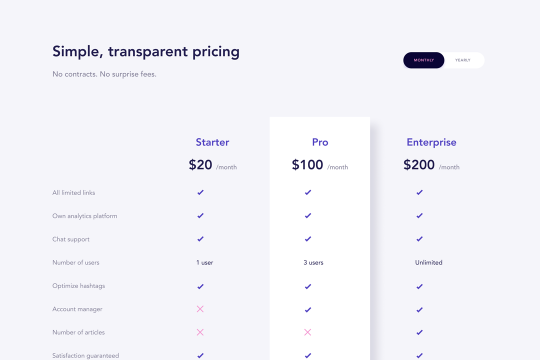
Pricing Table Component

Try the cloneable below

Cloneable tags

Description

The Pricing Table Component Webflow cloneable is a convenient and easy-to-use tool that allows you to quickly and easily add a pricing table to your website. This cloneable, created by the Flowbase team, is categorized under Pricing and Layout and is a done-for-you solution that makes it easy to get started. With the Pricing Table Component, you can easily display your pricing options and packages in a clear and organized way, helping users to understand your pricing structure and make informed decisions. Whether you are a service provider, product seller, or simply want to display pricing information on your site, the Pricing Table Component is a great choice. It is a good idea to use this cloneable on your website to improve user experience and add uniqueness to your website.

Add numbered paginations to your CMS collection lists via this small custom code snippet.

A unique slider pricing calculator that updates the pricing table based on the slider options in Webflow. This is a great way to customize your pricing page tailored to the users unique features that dictate your pricing for your Webflow site and service.

A wonderfully designed pricing comparison table with everything you'd need to showcase and feature a pricing page on your site.

Easily add a grainy effect to your entire site. This uses a grain png that was on a Webflow site. You can create your own grains as well to change it up.

A 4 column pricing table cloneable design featuring a bump effect for a primary package in Webflow. This beautiful pricing table includes features, package names, pricing info, and a 3D bump effect for the primary package that you'd like to put emphasis on.

Here's a dynamic pricing table that updates the pricing and currency symbols based on the selected currency in Webflow. A great way to show different pricing based on the currency selection of your users.

Here's a unique clickable process/steps section in Webflow. Whenever someone clicks on each step an interaction triggers that displays the number as well as further information about that specific step. Simply edit the content, update the interactions based on your requirements and enjoy a unique steps/process section on your site.

A simple way to create complex CMS grid layouts. You can define a layout for any item in the grid. You can make it multiple spans of columns and rows. You can also set columns and rows to the nth items as well as even or odd items.

DRAG
Real-time sorting by

An FAQ accordion for Webflow that includes all of the Webflow interactions to make it work. This accordion offers a simple design and is fully responsive with prebuilt interactions to make the magic happen.

A well designed starter dropdown navigation menu with hover over for Webflow. This consists of clear class names, 100% native interactions and basic dropdown triggers. It's also mobile friendly and responsive design.

A wonderfully designed pricing comparison table with everything you'd need to showcase and feature a pricing page on your site.

Here's a beautifully designed rotating testimonial slider in Webflow. A great way to build trust with your prospective clients. This testimonial component will auto slide between your testimonials with a smooth transitioning effect.

Power up your Webflow tabs through a timed, auto-rotating tabs feature. This is perfect to add emphasis to your Webflow tabs and more specifically demos, explainers, testimonials and just about everything else you can think of. This is a super simple script that adds auto rotation to Webflows native tabs.

Want to add smooth scrolling to your Webflow site? With this cloneable you'll be able to add smooth scrolling via luxy.js. Adding smooth scrolling doesn't need to be complicated and there are plenty of options to achieve this inertia type scroll effect although Luxy.js provides a great way to achieve this.

Here's a way to create a multi-step Webflow form that includes a step counter, custom confirmation animations and custom checkboxes. A perfect way to filter leads, create long forms that are filled out, and segment your lists/clients.

Here's a way of adding a unique, full screen image transition to your Webflow site via Three.js Each image loads a unique transition upon clicking them and turns the images full screen upon click.

DRAG
Real-time sorting by